

How to Care for DVDs, CDs, and Blu-rays: Cleaning, Storage, and Disc Rot Prevention
DVDs, CDs, and Blu-rays remain valuable collectibles for movie and music lovers, but discs can deteriorate over time. Proper care and storage help preserve them.
For movie collectors, owning a special-edition DVD or Blu-ray with exclusive packaging, booklets, and bonus features offers an experience that streaming services cannot always replace. However, keeping a disc in its case for years does not guarantee that it will remain in perfect condition. This guide explains how to clean, handle, store, and inspect optical discs, as well as the problem commonly known as disc rot.
1. Understand the Differences Between CDs, DVDs, and Blu-rays
Although CDs, DVDs, and Blu-rays look similar, their internal structures and data-layer positions differ. On a conventional CD, the reflective and data layers are relatively close to the label side. Serious damage to this surface can therefore affect the recorded information. DVDs typically use bonded plastic substrates, with the data layer located within the disc structure. Blu-ray discs place the data layer closer to the reading surface, but generally incorporate a hard protective coating designed to resist scratches. These structural differences mean that damage cannot always be assessed or repaired in the same way. A technique suitable for one disc format may be inappropriate for another.
2. Handle Discs Without Leaving Fingerprints or Scratches
The safest way to hold a disc is by its outer edge and center hole, avoiding contact with the reading surface. Fingerprints can leave oils and residue behind. If dust or hard particles are present, careless wiping may also create scratches. Make sure your hands are clean and dry before handling discs. Avoid placing a disc reading-side down on a table or another hard surface. After playback, return the disc to its case rather than leaving it on top of a player or desk.
3. How to Clean Optical Discs Safely
Before cleaning a disc, examine its surface to determine whether it has loose dust, fingerprints, or more persistent contamination. For light dust, use a clean, soft microfiber cloth suitable for optical discs. Ensure that neither the cloth nor the disc contains abrasive particles. When wiping is necessary, move in straight lines from near the center hole toward the outer edge. Avoid rubbing in circles along the disc's tracks. More persistent residue may require clean water or a cleaning product specifically recommended by the manufacturer. Avoid soaking discs, applying heat, or allowing liquids to penetrate damaged edges or bonded layers. Do not use rough paper towels, household polishing compounds, acetone, or unsuitable solvents. Allow the disc to dry completely before placing it in a player or returning it to its case.
4. Which Scratches Can Prevent a Disc From Playing?
Not all scratches cause the same level of damage. Some superficial marks may have little effect because optical disc formats use error detection and correction systems. Deeper scratches, damage to the data layer, or marks that interfere with reading over a substantial area may cause playback freezes, audio interruptions, or complete read failures. Circular scratches following the disc's tracks can be particularly problematic because they may affect a continuous section of data. CD collectors should also pay attention to damage on the label side, where the data and reflective layers are relatively close to the surface. Professional resurfacing equipment may improve certain scratches on the reading side of compatible disc formats. However, resurfacing cannot restore destroyed data layers or reverse internal deterioration. Blu-ray discs should not be subjected to ordinary resurfacing methods unless the equipment and process are specifically approved for that format. For rare collectible discs, consider the permanent changes and risks involved before attempting resurfacing.
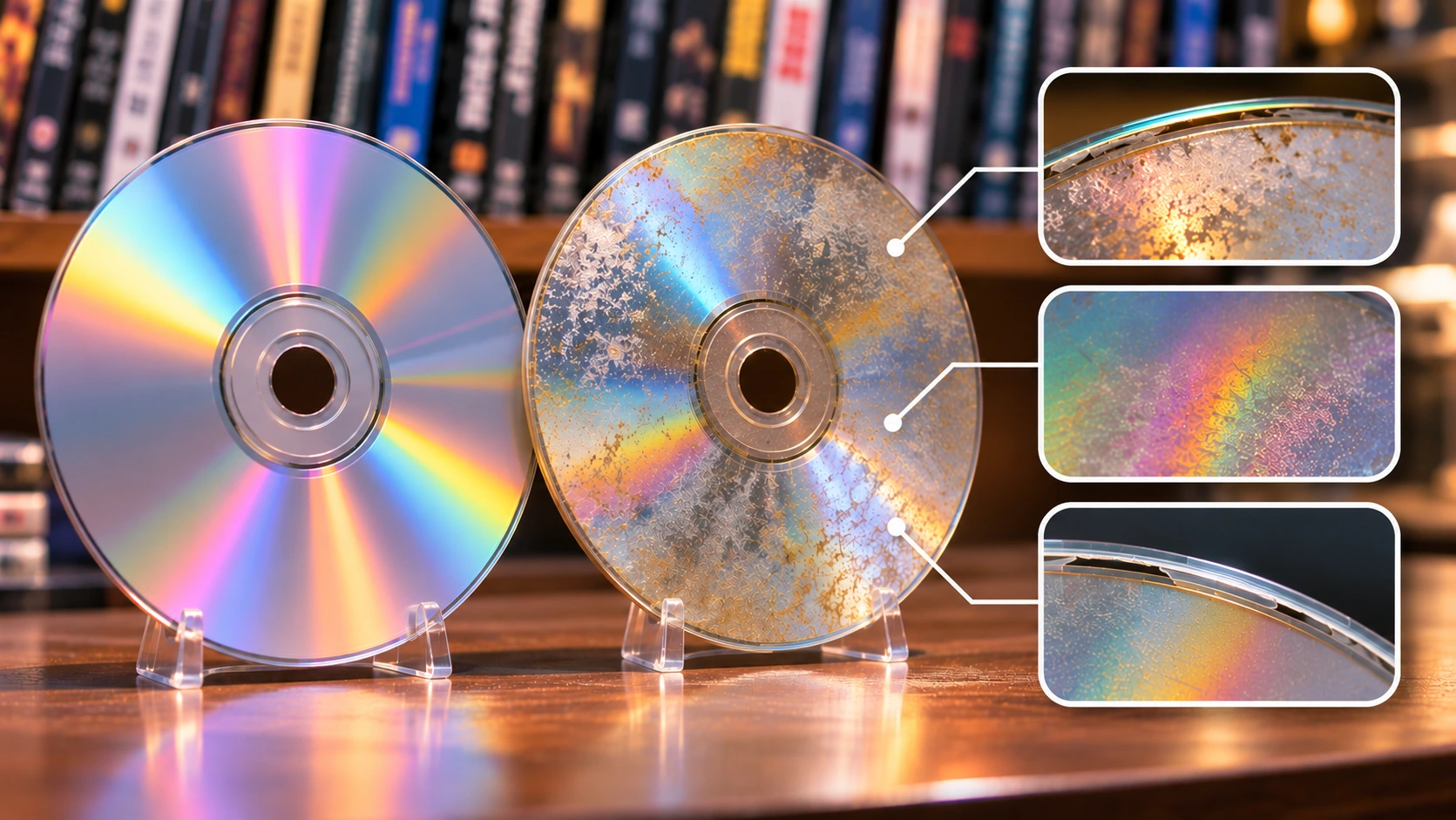
5. What Is Disc Rot?
Disc rot is a general term collectors use for forms of optical disc deterioration that can make recorded information difficult or impossible to read, even without obvious scratches. Possible causes include deterioration of reflective layers, problems with bonded layers, manufacturing defects, and other material failures, depending on the disc's construction. Visible signs may include unusual discoloration, changes in reflective appearance, or defects within the disc. However, discoloration does not automatically confirm disc rot. Conversely, a disc may look normal while still producing read errors. If the recorded or reflective layers have deteriorated, ordinary cleaning or polishing generally cannot recover the lost information.
6. Should Discs Be Stored Vertically or Horizontally?
For long-term collections, keep discs in suitable protective cases and arrange the cases vertically, much like books. This makes individual titles easier to retrieve and reduces the need to stack large numbers of cases on top of one another. Cases should have intact center hubs that hold discs securely without requiring excessive force for removal. Avoid storing loose discs without protection or stacking bare discs directly against each other. For multi-disc editions, check that each disc is correctly positioned and that broken plastic components are not pressing against its surface.
7. Protect Discs From Heat, Sunlight, and Humidity
Storage conditions can influence the longevity of optical media. High temperatures, excessive humidity, and substantial environmental fluctuations may accelerate the deterioration of certain materials, packaging, or bonded layers. Store discs in a relatively stable indoor environment, away from direct sunlight and heat sources. Persistently high humidity can also encourage mold on cardboard packaging and printed materials, while increasing the risk of other storage-related problems. Avoid leaving discs inside hot vehicles, poorly insulated attics, or areas prone to condensation. A stable, appropriate environment is more useful than attempting to make storage conditions extremely cold or dry without proper control.
8. Take Care of DVD and Blu-ray Packaging Too
For movie collectors, packaging and printed extras are often an important part of a release's collectible value. Slipcovers, Digipaks, SteelBooks, and limited-edition boxes have different vulnerabilities. Cardboard packaging can fade under strong light or deform in humid conditions. SteelBooks may develop scratches, dents, or corrosion if stored improperly. Keep packaging in a clean, dry location without excessive pressure from tightly packed shelves. If using protective plastic sleeves, choose materials appropriate for long-term storage. Avoid adhesive contact with printed artwork and sleeves that fit so tightly that they distort the packaging. Inspect included booklets, posters, and other paper collectibles periodically.
9. Should You Test Discs That Have Not Been Played for Years?
A disc may look perfect after years in storage, but appearance alone cannot guarantee that every part remains readable. Periodic playback or read testing can be useful, particularly for rare editions or recordings with sentimental value. Playing only the beginning of a movie is not a complete test. Errors may occur near the end or within particular sections of the disc. Compatible computer drives and diagnostic software may offer more detailed read checks, although available tests and their reliability vary by disc format and hardware. If a movie freezes, skips, or fails to load, check the disc's cleanliness and the player's condition before concluding that the disc itself has deteriorated.
10. Preserving Movies and Important Data for the Long Term
Preserving the physical disc and preserving the information recorded on it are related but distinct goals. No storage method can guarantee that every CD, DVD, or Blu-ray will remain readable forever. Longevity depends on manufacturing quality, materials, environmental conditions, and other factors. For personal recordings, such as family videos and photographs stored on optical discs, maintain additional backups on other storage media and periodically verify their integrity. For commercially released movies and other copyrighted content, copying may be restricted by local copyright laws and technological protection measures. Check the applicable rules before making copies. For collectors, preserving the original disc, packaging, and printed materials remains important even when alternative viewing options are available.
A Disc That Looks Perfect May Not Always Play Perfectly
Caring for DVDs, CDs, and Blu-rays involves more than preventing scratches. Proper handling, gentle cleaning, suitable cases, stable storage conditions, and occasional inspections can all help protect a collection. It is also important to distinguish between surface dirt, physical scratches, and deterioration of internal layers, because each problem has different causes and limitations. For movie collectors, caring for both the discs and their packaging helps preserve the collection for future enjoyment.